Explore Upcoming Workshops Near You and Ignite Your Passion for Innovation. Reserve a Seat today!

How to Get Reimbursed for Your Child's Laptop or Tablet with Arizona ESA
Build a future with Moonpreneur
DEVELOP TECHNICAL, SOFT, &
ENTREPRENEURIAL SKILLS
AGE 7-15 YEARS
RESERVE YOUR FREE WORKSHOP
Back to blog Education

How to Get Reimbursed for Your Child’s Tablet or Laptop with Arizona ESA Parents’ Guide

You bought a laptop for your homeschooler. Now what? Getting reimbursed through Arizona’s Empowerment Scholarship Account (ESA) isn’t complicated—but there are specific steps you need to follow.​ Let’s walk through the exact process. What Qualifies under Arizona ESA reimbursement technology: computers, laptops, & more  Before you buy anything, confirm it’s eligible:​​ Approved devices include: Personal […]

Shivani Sharma December 26, 2025 3 min read

How to Get Reimbursed for Your Child’s Tablet or Laptop with Arizona ESA Parents’ Guide

|
Reimburse Your Child Laptop With Arizona ESA

You bought a laptop for your homeschooler. Now what?

Getting reimbursed through Arizona’s Empowerment Scholarship Account (ESA) isn’t complicated—but there are specific steps you need to follow.​

Let’s walk through the exact process.

What Qualifies under Arizona ESA reimbursement technology: computers, laptops, & more 

Before you buy anything, confirm it’s eligible:​​

Approved devices include:

  • Personal computers and laptops
  • Tablets (including iPads)
  • Calculators
  • Printers
  • Microscopes and telescopes
  • Accessories like keyboards and styluses for tablets

Not approved:

  • Televisions
  • Telephones or smartphones
  • Video game consoles (including PlayStation or Xbox)
  • Home theater equipment

Pro tip: If you’re unsure whether something qualifies, contact the ESA team at 602-364-1969 before you purchase, or you can go through the Arizona ESA-approved technology devices list 2025

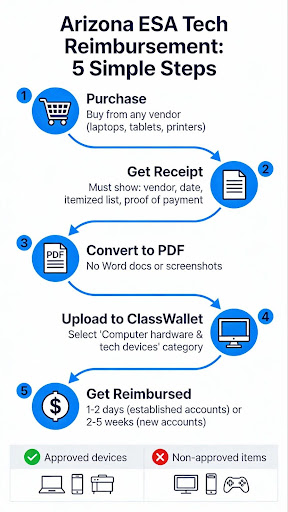
5 Steps Of Arizona ESA Tech Reimbursement

Step-by-Step: The Reimbursement Process

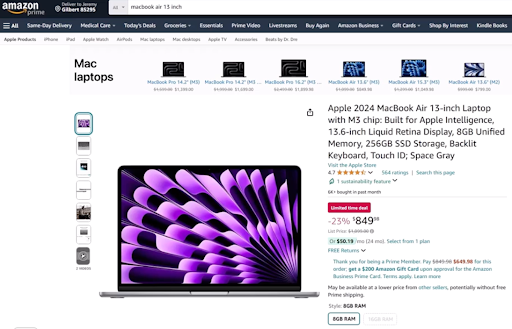
Step 1: Make Your Purchase

Buy your laptop or tablet from any vendor—Amazon, Best Buy, Apple, or a local retailer. There’s no brand restriction.

Step 1 Of Arizona ESA Tech Reimbursement

Step 2: Get a Proper Receipt

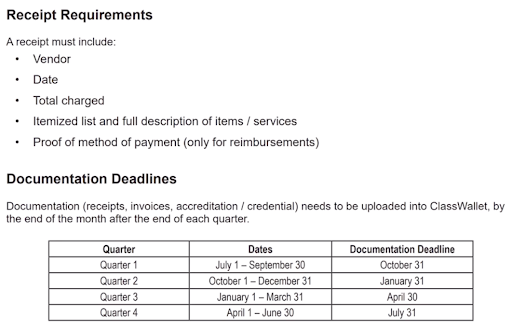
This is critical. Your receipt must include:​

  • Vendor name (Amazon, Best Buy, etc.)
  • Purchase date
  • Total amount charged (including sales tax)
  • Itemized list with full descriptions of each item
  • Proof of payment (credit card statement, bank record, or payment confirmation)
Receipt Requirements For Arizona ESA Tech Reimbursement

Step 3: Convert Receipt to PDF

ClassWallet (Arizona’s ESA payment platform) only accepts PDF files—not Word documents. Save or scan your receipt as a PDF before uploading.​​

Step 4: Submit Through ClassWallet

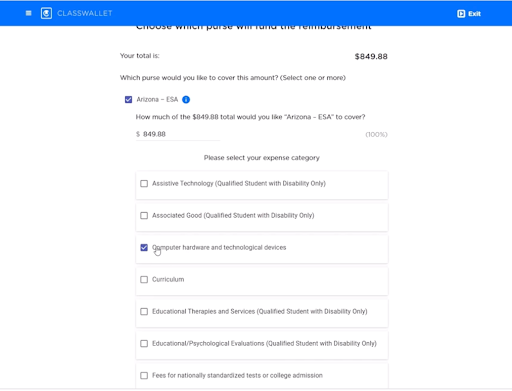
Log in to your ClassWallet account and click “Start New Reimbursement”.​​

Enter:

  • Store name (example: amazon.com)
  • Final price (including tax)
  • Upload your PDF receipt

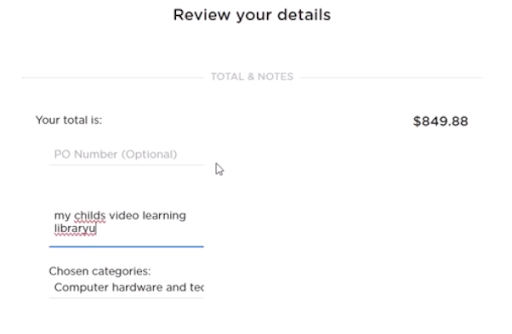
Then select the category: “Computer hardware and technological devices”.​​

Classwallet Step Of Arizona ESA Tech Reimbursement

Step 5: Add Notes (Optional)

If you’re buying something that might need explanation, like a specialized microscope, add a brief comment explaining its educational purpose.​

Final Step Of Arizona ESA Tech Reimbursement

Hit submit. Done.​​

Special Scenario: Multiple Kids, One Receipt

Bought three laptops for three ESA students on one receipt? No problem.​

Submit that same receipt three times—once per child—and divide the total cost accordingly. You’ll need to do some math to split the sales tax proportionally.​

How Long Until You Get Paid?

Reimbursement timelines vary:​

  • Established accounts: 1-2 days (sometimes same-day)
  • New accounts: 2-5 weeks for large purchases like laptops

If you can’t afford to wait weeks for reimbursement, plan accordingly.​

The ESA reimbursement process is straightforward once you know the rules. Get a complete receipt, convert it to PDF, and submit it through ClassWallet under the correct category. Just remember: if your purchase seems borderline, call ESA first. It’s easier to ask permission than deal with a denied reimbursement later.

Need Help?

Arizona Department of Education – ESA Program
Phone: 602-364-1969
Email: ESACallCenter@azed.gov

Hours: Monday-Friday, 8 AM – 5 PM

ClassWallet Support
Phone: 1-877-969-5536
Email: help@classwallet.com
Hours: Monday-Friday, 8 AM – 8 PM EST; Saturday, 10 AM – 4 PM EST

Shivani Sharma

Shivani Sharma

Shivani is a content writer with a flair for creative expression, using words as her playground to weave stories that inspire, educate, and captivate. With a strong background in educational technology and expertise in robotics, Shivani brings a unique perspective to every piece, blending imagination, empathy, and a deep understanding of the human experience. Her work reflects a passion for making technology accessible and engaging for all audiences.
Subscribe
Notify of
guest

0 Comments
Inline Feedbacks
View all comments

RELATED ARTICLES