Attend our in-person Robotics & Math




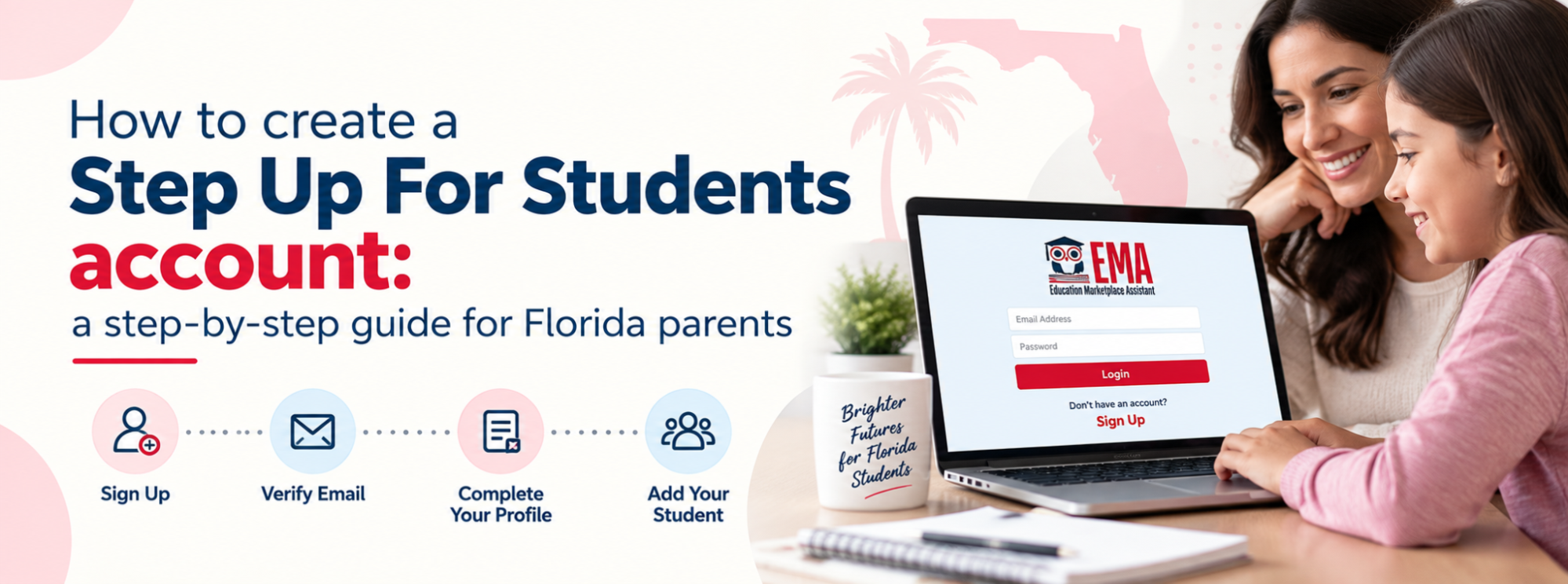
Every Florida scholarship from Step Up For Students runs through one login. Before you can apply for the Private School Scholarship, the Unique Abilities Scholarship, or the Personalized Education Program, you need a parent or guardian account in a portal called EMA.
Setting it up takes about ten minutes. The catch is that a few small mistakes at signup, like using the wrong email address or creating a second account, cause problems that take weeks to unwind. This guide walks through the process with screenshots and flags where parents get stuck.
What Step Up For Students and EMA actually are
Step Up For Students is a Jacksonville-based nonprofit and a state-approved Scholarship Funding Organization. It administers most of Florida’s K-12 school choice scholarships, including:
- Private School Scholarship, which covers the Florida Tax Credit Scholarship (FTC) and the Family Empowerment Scholarship for Educational Options (FES-EO). Available to students eligible for K-12 public school in Florida regardless of household income, worth roughly $8,000 on average toward tuition and related costs.
- Unique Abilities Scholarship (FES-UA), an education savings account for students with qualifying disabilities, averaging around $10,000 a year.
- Personalized Education Program (PEP), an education savings account for K-12 students who are not enrolled full-time in a public or private school. That includes many families [educating at home](https://mp.moonpreneur.com/blog/homeschooling-option-or-future/). Open regardless of household income.
- Transportation Stipend: $750 per household for K-8 students attending a public school other than their assigned one.
EMA stands for Education Market Assistant. It is the portal where you apply, upload documents, track your application, pay approved providers directly, and shop for curriculum and materials. Once your student is funded, you will be logging into it for years.
Before you start: three things worth getting right
Use a .com email address. Step Up For Students specifically recommends Gmail, Yahoo, or Outlook and warns that country-code extensions like .es, .mx, .uk, .de, and .in can cause problems with account access and notifications. If you have one of those, get a free Gmail address before you begin.
Use a desktop or laptop, preferably in Chrome. The portal is built for it. Applying on a phone is where most “the page froze” complaints come from.
Have a phone that can receive a verification code. EMA uses two-step verification. If you cannot complete it later, a Step Up representative will need to reset your password for you, which means a call during business hours.
Creating your account, step by step
1. Go to the Step Up For Students application page
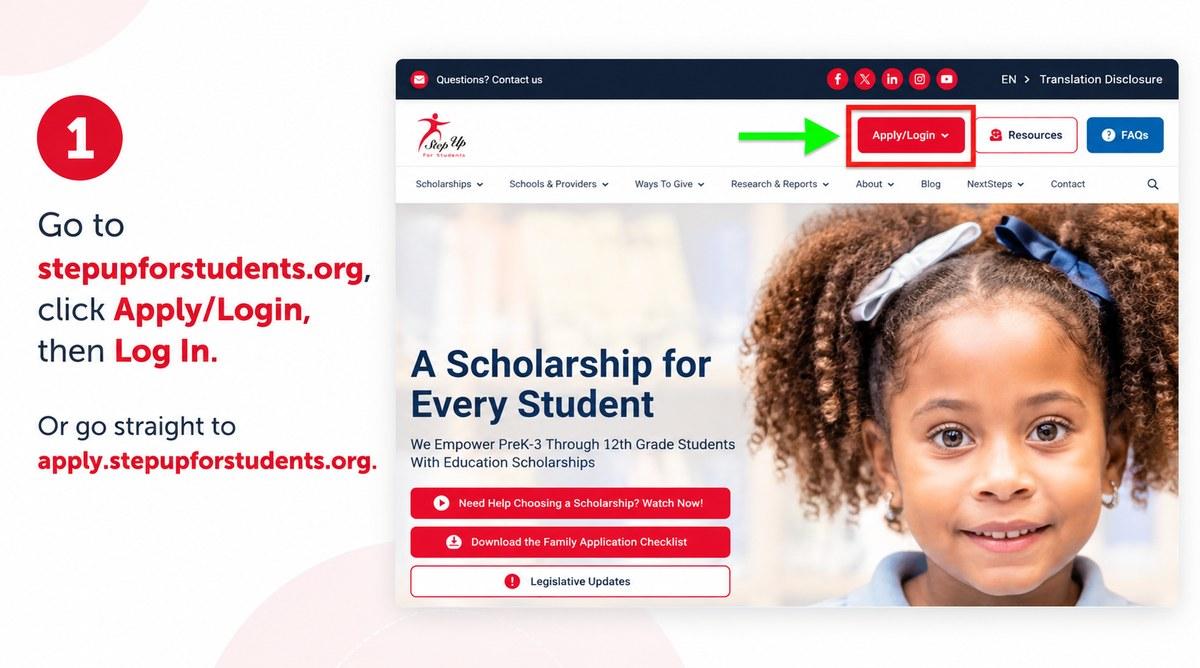
Visit stepupforstudents.org and click Apply/Login in the top right, then choose Log In. You can also skip the homepage entirely and go straight to apply.stepupforstudents.org.
2. Choose Sign Up, not Login
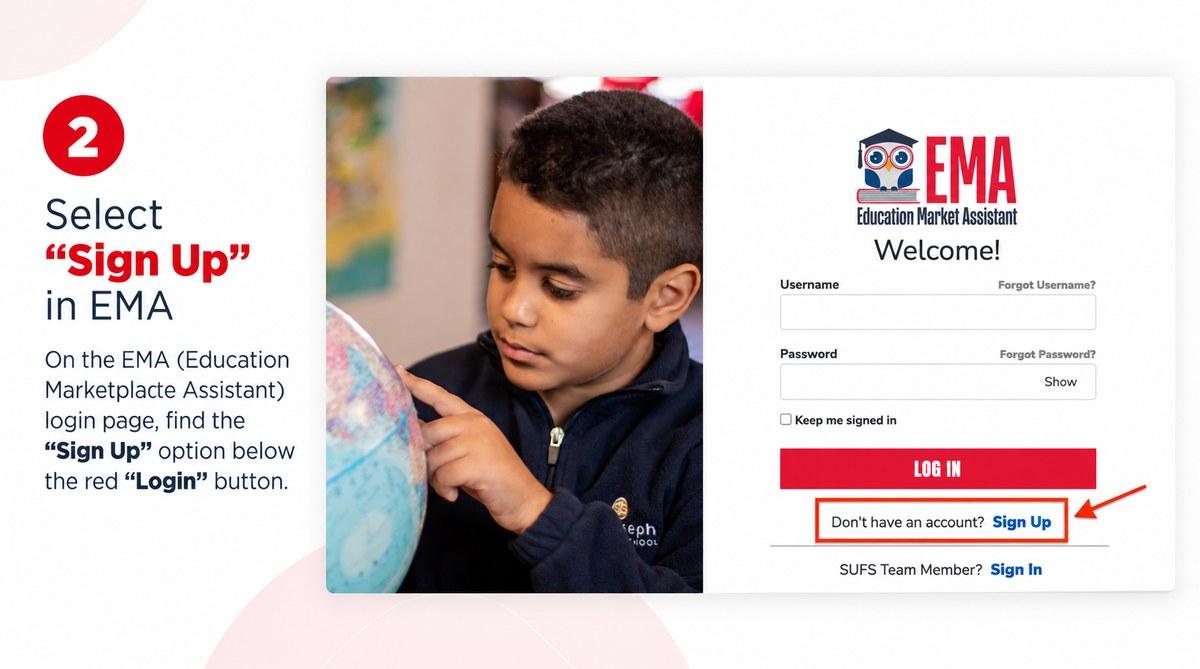
New families miss this constantly. The large red Log In button is for people who already have an account. Below it is a line reading “Don’t have an account? Sign Up.” That blue Sign Up link is the one you want.
3. Enter your email address
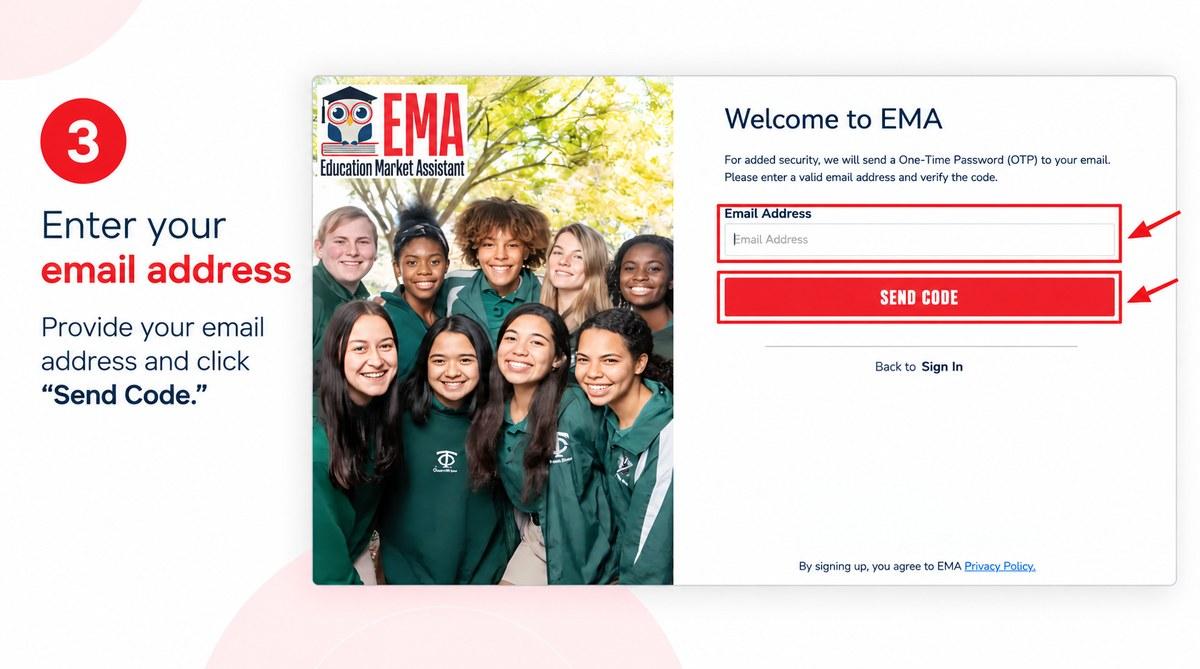
Type the email you plan to use for the next several years, then click Send Code. EMA sends a one-time password to that inbox. This address gets tied to your student’s scholarship record, so avoid work emails you might lose access to.
4. Verify your email
Check your inbox for the verification code, enter it in the Verification Code field, and then click Confirm. If nothing arrives within a few minutes, check your spam before using the “Resend verification code” link.
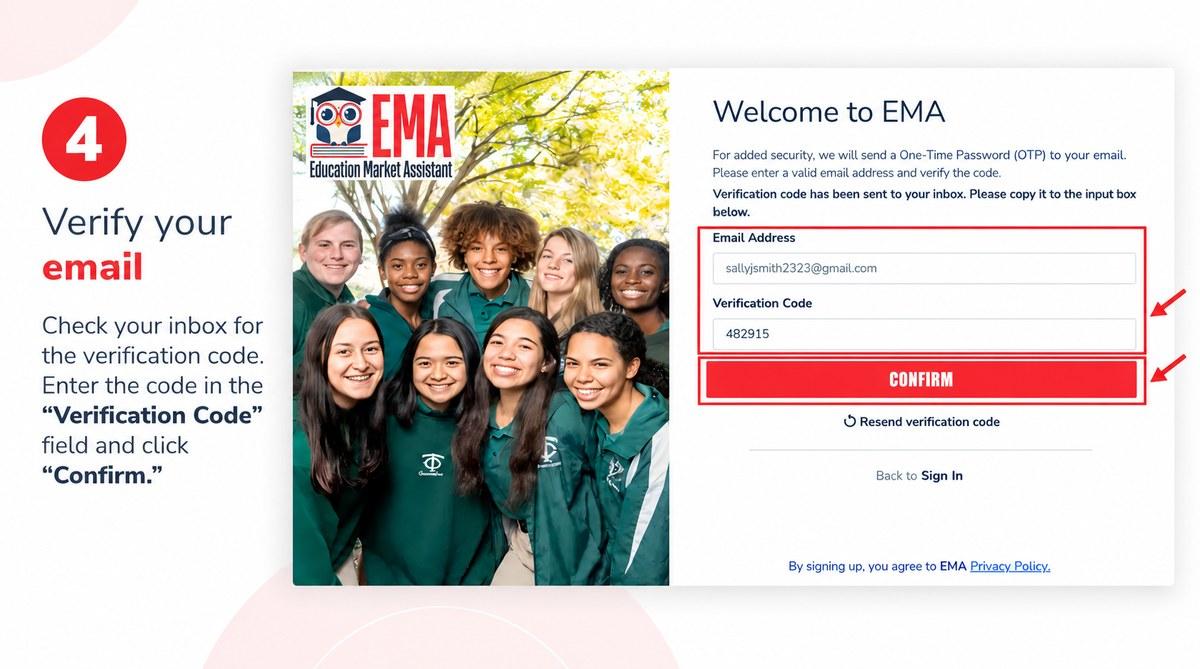
5. Create your account details
This screen asks for a username, your first and last name, and a password you enter twice. Your password needs lowercase letters, uppercase letters, numbers, and symbols. Enter your legal name exactly as it appears on your ID, since it needs to match the documents you upload later. Then click the red Continue button.
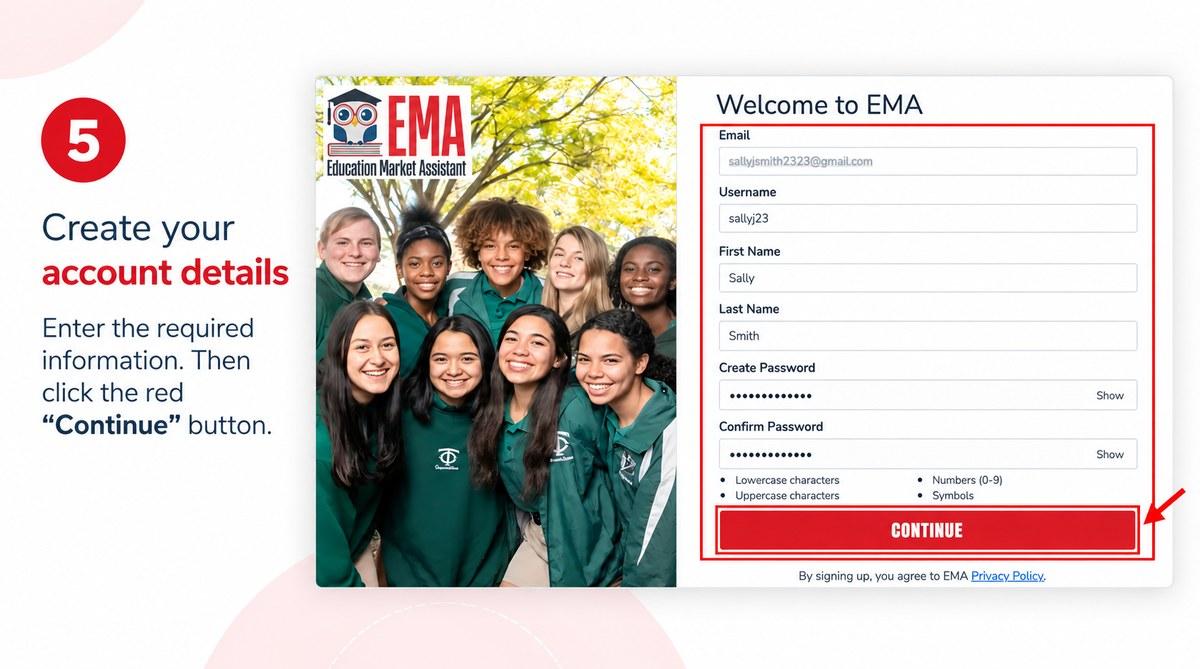
6. Set up your security questions
You will pick three security questions from dropdown menus and type an answer for each, then click Continue. Write these answers down somewhere you will find them again. Combined with two-step verification, they are what stands between you and a support call if you get locked out.
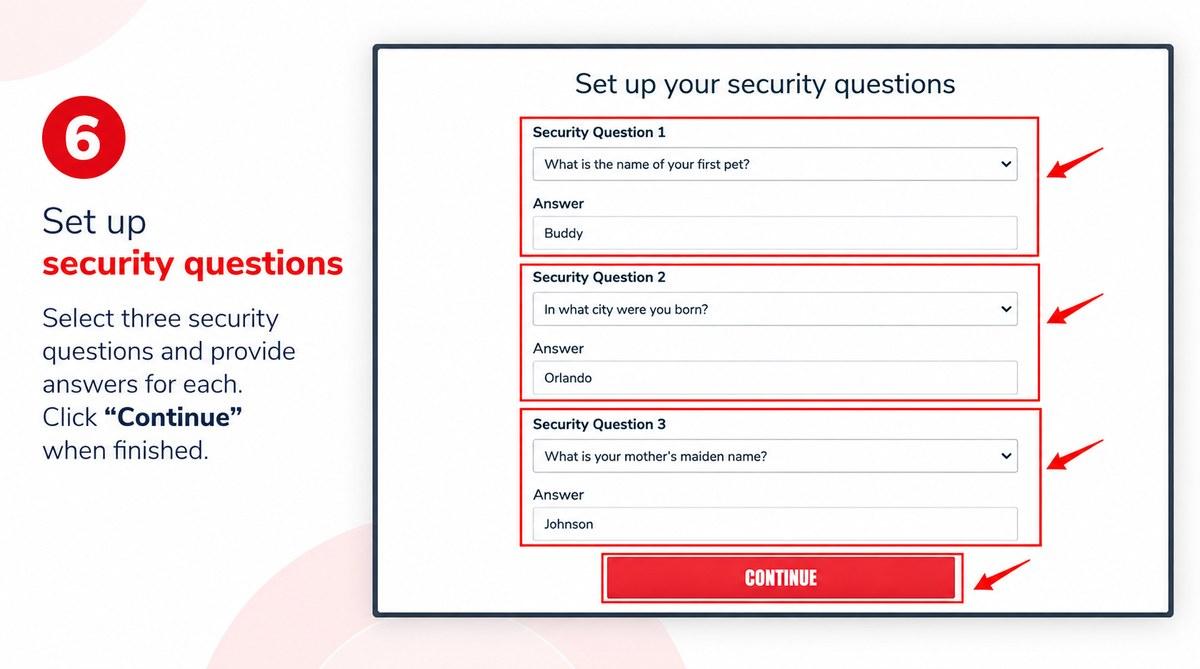
7. Accept the terms and conditions
A Terms & Conditions box appears over your profile. Read the certification prompt, tick Check the box to Certify, and click OK.
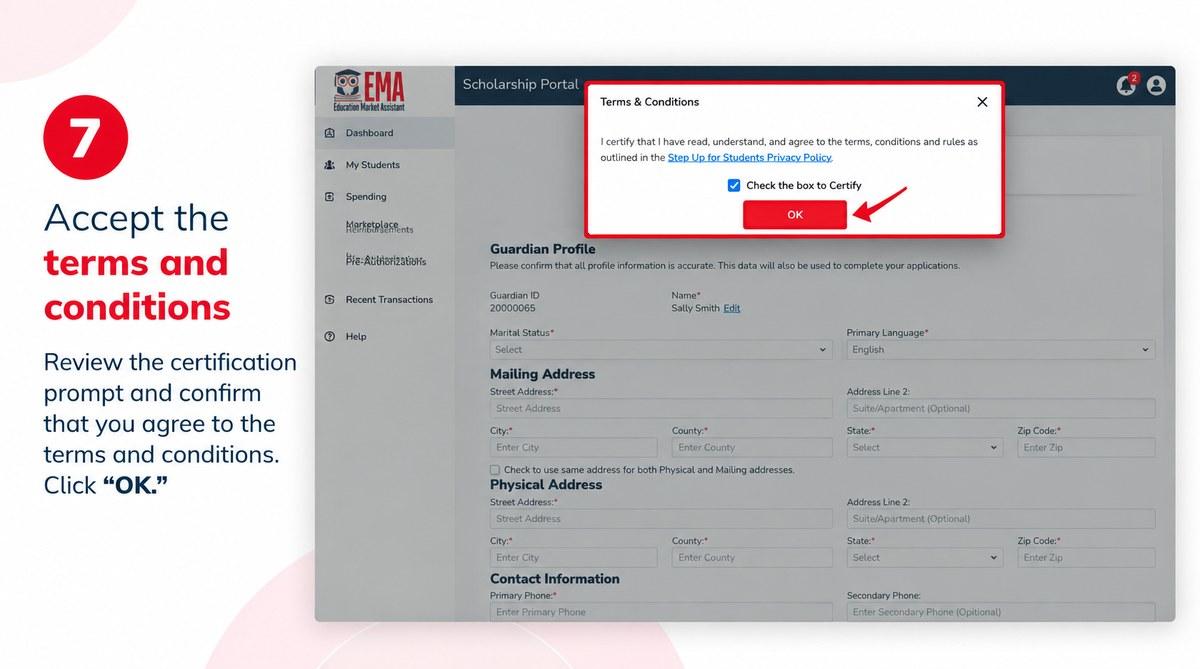
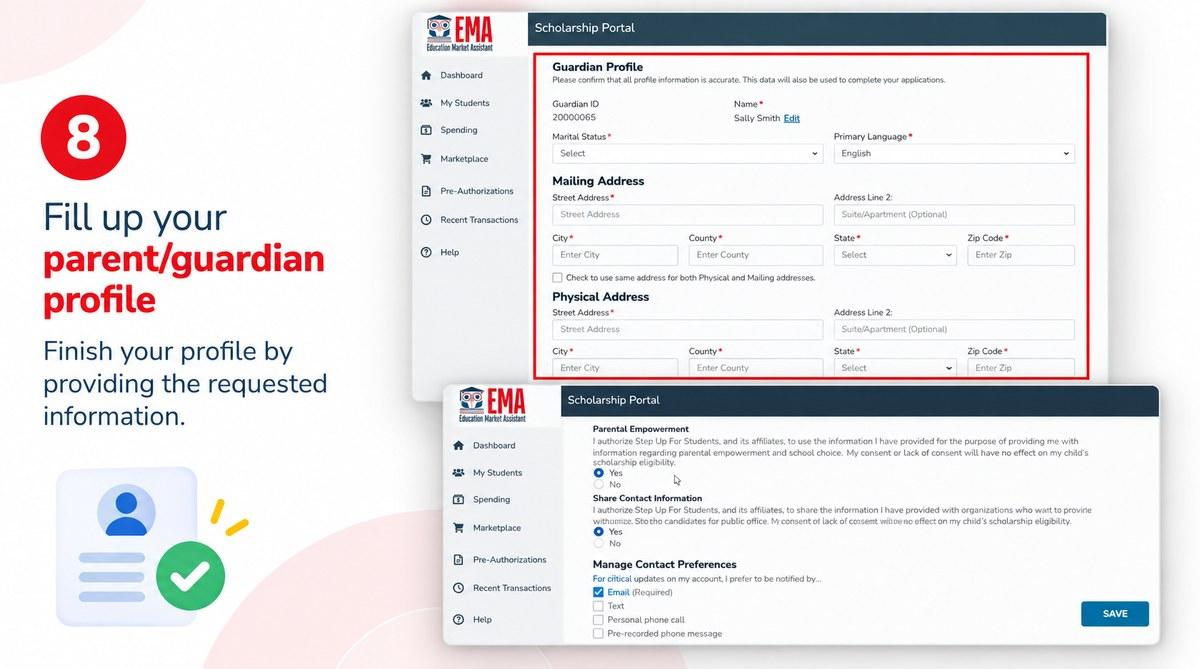
8. Complete your parent or guardian profile
The Guardian Profile asks for marital status, primary language, your mailing and physical address, and a primary phone number. Note the County field: Florida residency matters for eligibility. If both addresses match, tick the box to copy one into the other.
Further down you will set contact preferences. Email is required; text and phone are optional. Two consent questions also appear, and answering no to either has no effect on your child’s scholarship eligibility.
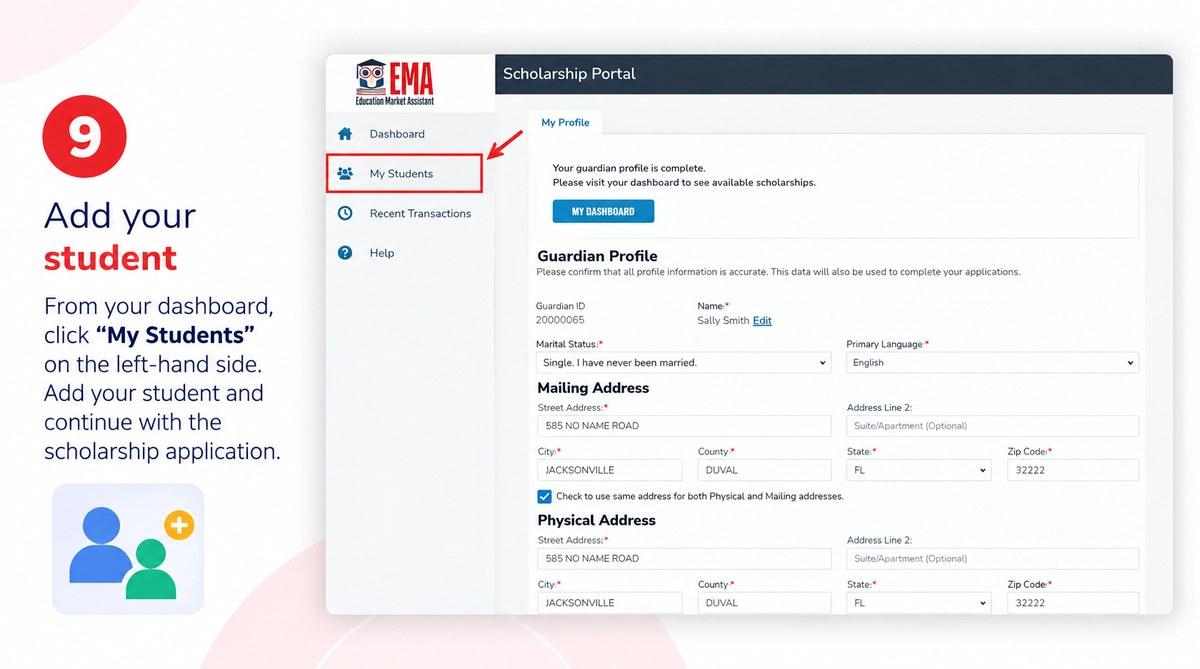
9. Add your student
Once your guardian profile is complete, EMA confirms it and points you to your dashboard. Click My Students in the left-hand menu, add your child, and continue into the scholarship application. Adding the student is a separate action. An account with no student attached cannot be considered for funding.
Once that is done, you can log in to EMA any time at apply.stepupforstudents.org.
One rule that causes more trouble than anything else
A scholarship student can only be linked to one parent or guardian profile, and Step Up For Students tells families never to create a second EMA account.
Parents create duplicates for reasonable-sounding reasons: they forget which email they used, two parents each start an application, or a login error makes starting over feel cleaner. Duplicate accounts split your records and require manual intervention to untangle.
If you cannot get in, try the Forgot Username and Forgot Password links first. If those fail, or if guardianship of your student has changed, call Step Up For Students at 1 (877) 735-7837, Monday through Friday, 8:00 a.m. to 5:00 p.m. ET.
When you can apply
For the 2026-27 school year, renewal families for all three scholarships applied between February 1 and April 30, 2026.
As of September 2026, applications for the 2026-27 Private School and Unique Abilities scholarships are still available. PEP applications for 2026-27 closed on April 30, 2026, and the program is at capacity for new students, though renewing PEP students were still able to apply. Windows for 2027-28 have not opened yet.
Three groups can apply at any point during the school year: dependents of active-duty U.S. Armed Forces members, students in foster care or out-of-home care, and students who experienced bullying or harassment at a public school. Those families should call Step Up directly. Because dates and capacity change, check the official apply page before you count on a deadline.
Fixing the problems parents hit most
- Documents will not upload. Files must be under 5MB and in JPEG, JPG, PNG, or PDF format. Upload one document per assessment, though a single document can have multiple pages. Password-protected files will fail, so remove the password first. If a scan is too large, compress it or merge pages into one PDF.
- Pages load slowly or behave strangely. Clear your cache and cookies, then close and reopen the browser. A different browser, a different computer, incognito mode, or temporarily disabling extensions also helps.
- You get an error message you do not recognize. Screenshot it, note any numbers or codes shown, and email support with the subject line “EMA IT ASSISTANCE” along with your device and browser details. If a previously saved password stopped autofilling, use Forgot Username and Forgot Password rather than guessing.
A security note worth repeating
Step Up For Students will never ask for your account credentials or banking information by phone, text, or email. Anyone who does is not Step Up. Using third-party services to reach your account also violates its user agreement and can expose your data, so be wary of anyone offering to handle your application from inside it.
Can you use the money for tutoring and enrichment?
If your child is funded through PEP or the Unique Abilities Scholarship, the award sits in an education savings account and covers approved expenses beyond tuition, including instructional materials, part-time tutoring, and approved online providers. Each program’s family handbook lists the categories.
What it will not cover is a provider who is not registered with Step Up. Once your account is funded, check the provider directory and MyScholarShop inside EMA before you enroll in anything. That directory is the only real-time record of who is approved.
Moonpreneur is one of those registered providers. In EMA, open Marketplace, then Find a Provider, select your student, and search Moonpreneur Tutoring Center. It is listed under Elective Courses, delivered online, for individuals and groups.
Moonpreneur is an ed-tech company that teaches tech entrepreneurship to children aged 7 to 16. Its Innovator Program blends technical skills, power skills, and entrepreneurial skills across streams including Robotics, Game Development, App Development, and Advanced Math.