



You got approved for an Education Savings Account. The funds hit your account. Then you bought what you thought was an approved educational expense—and suddenly your account is frozen. This is happening to parents across Arizona every week. Not because they’re trying to cheat the system, but because ESA spending rules are genuinely confusing. And when you get it wrong, the consequences hit fast.
Let’s clear up what you can actually spend your ESA dollars on, what crosses the line, and how to avoid the mistakes that are tripping up other families.
What the Rules Actually Say
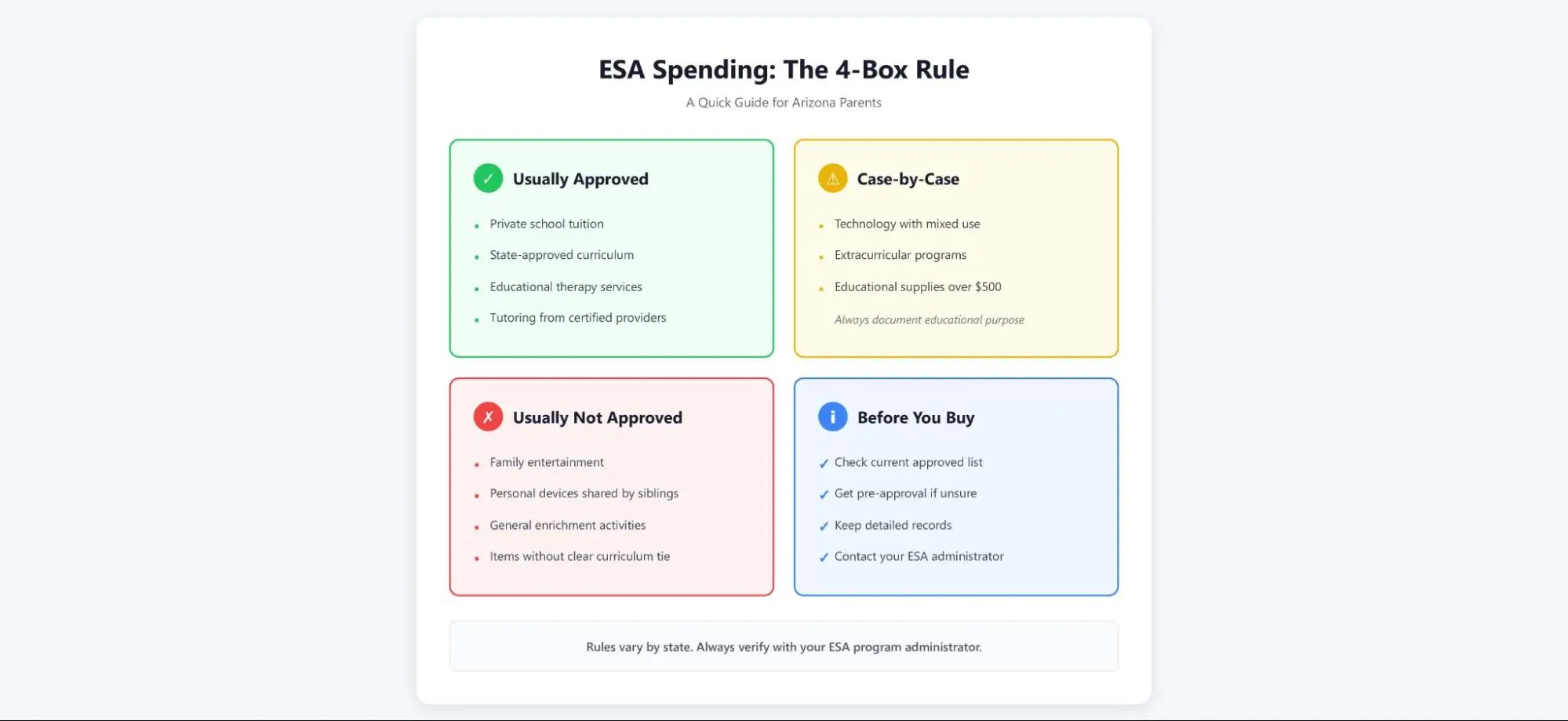
Arizona’s ESA program allows families to use state funds for a wide range of educational expenses. According to the Arizona Department of Education, approved categories include private school tuition, curriculum materials, educational therapies, tutoring, and certain technology purchases.
But here’s where it gets tricky: the devil is in the details. A laptop for schoolwork? Generally approved. A laptop that’s also used for gaming and streaming? That’s a gray area that could trigger a review.
The Goldwater Institute reports that roughly 75,000 Arizona students were enrolled in ESA programs as of 2024. But data from the state Treasurer’s office shows that hundreds of accounts face spending reviews or temporary freezes each quarter—often for purchases parents genuinely believed were educational.
The Most Common Spending Mistakes Parents Make
Mixing personal and educational use. You can buy a tablet for your child’s online math program. You cannot buy a family iPad that everyone shares. The line between these two scenarios isn’t always clear to parents, but auditors draw it strictly.
Assuming “educational” means “approved.” Parents have had accounts flagged for buying museum memberships, educational board games, and even professional development books for themselves as homeschool teachers. These might support learning, but they don’t always meet the state’s technical definition of allowable expenses.
Not keeping adequate documentation. Every purchase needs a paper trail that proves educational use. A receipt isn’t always enough—you may need to show how the item connects to your child’s education plan.
Research from the EdChoice network indicates that administrative burden is a leading cause of family stress in ESA programs nationwide. Parents aren’t failing because they lack commitment. They’re struggling because the compliance requirements weren’t clearly explained upfront.
Recommended Reading: ESA Technology Expenses Guide: Laptops, Computers & Smart Boards (What’s Actually Allowed)
What This Means for Your Family
The ESA program offers genuine flexibility, but it demands careful record-keeping and a conservative interpretation of what counts as “educational.”
Before making any significant purchase, ask yourself three questions:
- Can I document exactly how this supports my child’s approved education plan?
- Will this item be used exclusively for educational purposes?
- Do I have a backup plan if this purchase gets flagged?
If you’re unsure about a specific expense, contact your ESA program administrator before you buy. Getting pre-approval in writing takes ten minutes and could save you from losing access to thousands of dollars.
What You Can Do Right Now
Review your state’s current approved expense list. Rules change, and what was allowed last year might not be allowed today. Arizona’s official ESA website maintains an updated list at https://www.azed.gov/esa.
Set up a dedicated filing system. Keep receipts, but also keep photos, screenshots of educational software being used, and notes connecting each purchase to your child’s learning goals. The National Association for the Legal Support of Alternative Schools recommends treating ESA documentation like tax records—assume you’ll need to defend every purchase.
Join a parent support group. Other ESA families can tell you which vendors are familiar with ESA requirements and which purchases tend to trigger reviews. Facebook groups and local homeschool co-ops are good starting points.
Budget conservatively. Don’t spend your full ESA balance on assumptions. Keep 10–15% as a buffer in case you need to return something or cover an expense that wasn’t reimbursed.
The ESA program can genuinely expand your child’s educational opportunities. But only if you understand—and follow—the spending rules that protect your access to those funds.
Helpful Resources for Parents
- Arizona Department of Education ESA Program: https://www.azed.gov/esa – Official guidelines, approved expense categories, and contact information
- EdChoice: https://www.edchoice.org – Independent research on school choice programs, including ESA implementation nationwide
- Goldwater Institute ESA Resource Center: https://www.goldwaterinstitute.org/education-savings-accounts/ – Policy updates and parent advocacy resources
- Arizona Coalition for Charter Schools: https://www.azcharters.org – Guidance on educational choice options in Arizona
Moonpreneur is on a mission to disrupt traditional education and future-proof the next generation with holistic learning solutions. Its Innovator Program is building tomorrow’s workforce by training students in AI/ML, Robotics, Coding, IoT, and Apps, enabling entrepreneurship through experiential learning.